Need user insight? Get the Playbook 📕
Pragmatism matters—especially when it comes to successful user insight adoption. Everybody you work with is busy, oversaturated, and often frazzled. They don't have spare mental capacity to understand context, intent, and meaning. Therefore, it's your job as a UX Researcher to make understanding user insights straightforward.
You began this journey by learning how to properly frame user research studies, leveraging standard frameworks as you've uncovered how to make sense of user data via analysis, and ultimately you're striving to see action based on your user insights. However, to get there, we must first articulate clear, meaningful insights to our product teams.
Work smarter, not harder.
The Turbo UXR Playbook is your tactical reference 👇 guide — free to download!
Get the Playbook
Learn More
In this article, you'll learn what is a user insight at its most foundational level, why it's necessary to make them well-documented and standalone, and exactly what parts make up the whole of a meaningful user insight. Pro tip: use AI tools to generate the detailed content based on your provided framework to scale the process quickly and accurately.
Users are awaitin', so let's get to the makin' 🍄🟫.
UX Research User Insights Research Analysis Insight Frameworks Qualitative Research Research Operations Product Strategy Communication Methods
Insights are the lifeblood of the UX research business. They're our currency. They create value. And they prove our value. If you do nothing else as a user researcher, you must uncover valuable insights for the business—in a timely and relevant manner.
An insight is a new piece of information that gives us a better understanding of the user, while providing an opportunity for the business to do something about it. It's an a-ha! with an angle for the business to act upon.
Insights can be mined in two primary ways: qualitatively and quantitatively. Qualitative methods, such as moderated, unmoderated, and observational users studies uncover low-volume, high-impact examples of user behavior, sentiment, and psychology. Quantitative methods, such as user surveys and statistical regression / modeling substantiate evidence to create more confidence, and/or highlight irregularities in the dataset to inform more detailed digging.
See our related articles to learn more about which methods to choose/use to generate user insights [future article], and how to leverage user insights over the long-term for the largest impact.
Work smarter, not harder.
The Turbo UXR Playbook is your tactical reference 👇 guide — free to download!
Get the Playbook
Learn More
Good documentation keeps insights alive beyond any one single project. It's not easy to find the time—but pays off over the long-term, as it creates a platform for strategic value creation.
Without proper insight documentation, all is lost. Time and attention naturally move on to other more important aspects of the business and users, and those hard-earned insights are swept away. Unless! You take the time to document them properly.
Surely, quality documentation is a pain. Why? Because once your product team has gotten the gist of the insights from your initiative, they'll incorporate the findings and make relevant decisions. They won't need—or want—you to spend more time on polishing the insights for later / alternative use. It'll be truly hard to find the time to do it right. But trust us, it's the right thing to do.
Overall, good documentation ensures that the future you, teammates, product partners, leaders, and others can revisit your work, and elevate or build upon it. Proper detailing of the context, meaning, relevance, and recommendations helps the organization digest and reflect on the user insights over time. It builds up the user "muscle" of the company, not just uses and abuses it. All in all, good insight documentation prioritizes the creation of long-term strategic value. And it's important to have the right ingredients baked in.
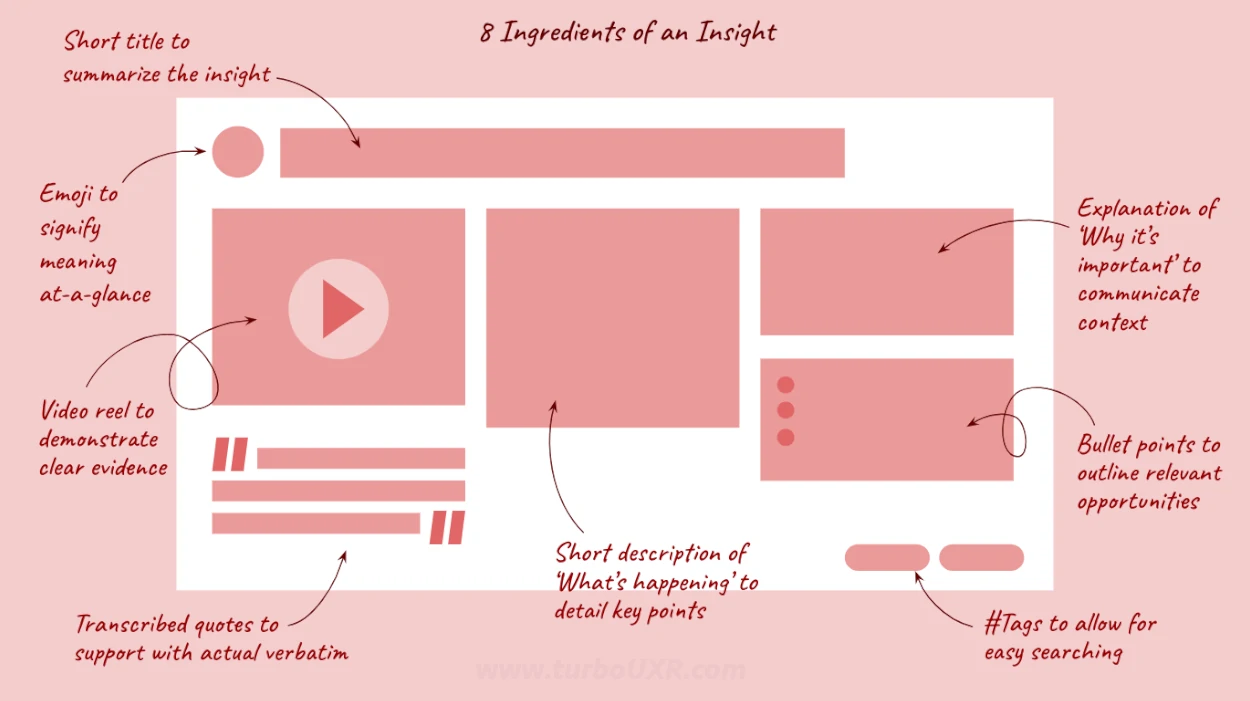
The insight title summarizes the whole situation into one short phrase. Sometimes, you can begin with this 3–10 word statement if it's already solidified in your mind, and other times you'll need to wait till the end to synthesize the rest of the page here. Either way, use it as a mechanism to describe the insight's meaning, context, and opportunities in one fell swoop. Additionally, you might need to revisit after documenting several insights to re-normalize your title statements to be similar in structure, and mutually exclusive in meaning.
Tip: When in doubt, wait till you've filled out the remainder of the sections, and come back to this last. Use AI tools to feed in your verbatim (sensitive details removed), and explanation of what and why, to have it iterate on some fun, catchy, and to-the-point title options.
Return to overview ⤴We've learned over the years that having a single emoji to signify the essence of each insight is both fun and useful. This emoji can break the monotony of text, and serve as a simple visual reference for each insight. Additionally, they can be used when naming/editing video clips, and other files, so you can quickly scan for what you're looking by eye 👁️. They help readers (including yourself!) grasp the gist/theme of what they're actively reading both consciously and un–.
Tip: Leverage the insight emoji across slides, file names (i.e. video clips), user-facing survey questions, and more to keep the visual reference alive. A quick Google search or ChatGPT reference can help surface the appropriate icon for each insight, to reduce redundancy and increase comprehension.
Return to overview ⤴Nothing beats hearing and seeing users directly. Speaking about and showcasing real pain points and opportunities in short-short video clips gives users serious credence in any organization. In our experience, even companies that are not heavily user-centered, or have users that are difficult to access, it helps tremendously to drive the insights' main point home. There's very little arguing with tangible, well-documented video evidence. Ideally, it's used to spark internal debate, ideas, discussion, and interest.
Tip: Cut up 30-60 second video clips of the target user. Even better if you have 3 different users showcasing something similar. Use Premier Pro AI tools to automatically add sub-titles for enhanced listening and sharing with sound off. Furthermore, place the insight title with emoji overtop the associated clip, export and insert directly into the desired communication channel. Share clips in slides, Slack channels, emails, and Dovetail sites to track views. Later on, creating broader insight themes through compilation of video clips will be even more powerful since all the clips will be pre-tagged and titled based on their respective insight.
Return to overview ⤴Some people watch, some listen, and some read. Having standalone verbatim quotes that are represented in the video clips creates value in two ways. First, you can easily read out the insight based on the verbatim to quickly get the users' voice. It optimizes for situations when reference information is needed immediately. Two, written verbatim(s) allow for increased searchable terms across documents—proving extra valuable when synthesizing down the road.
Tip: Leverage auto transcription tools to make this process easier/faster. Modern tools do all the transcribing for you. You can even clip video based on the captions, as you copy and paste the content, to achieve two goals at once. Pick the single strongest quote, and use ellipses to shorten it to its essence. Copy and paste in slides, chats, and more. See the next section to learn how to use selected verbatim(s) to help you fill out 'what' and 'why' sections with the help of modern tools.
Return to overview ⤴What's happening—the core element of the entire insight. Use this section to describe exactly what's going on in the situation. Carefully detail 'who' is doing 'what, where, when, and how'. Oftentimes this can be written in very basic (duh!) fashion—because we're looking to state in layman's terms the subject of the matter at hand.
Tip: ELI5 so that everyone knows what's important, without confusion. Even if this feels painful, it's amazing how much of the foundational insight needs to be explained to coworkers. Funny enough, we've found AI to be very good at "getting it", much more so than internal stakeholders. Therefore, use AI chatbots like ChatGPT to feed many examples of pre-selected verbatim that get to the fact of what's going on. Prompt AI to output the same basic framework you plan to use for all the insight descriptions. For example, 'Who?' is doing 'What?', and 'Why?'.
Return to overview ⤴Not to be confused with 'why' the user is doing what they're doing in the above section. This area is meant to describe 'Why' this insight finding is important to the overall business, product, and user experience. Consider it a meta description. Tell the audience why this matters in the broader context. What's happening that's unique, and why should we care?
Tip: Help others make the leap from what's happening ➜ why it's important. Not everyone follows the logic, and sometimes there's a small jump that needs to be made as to the importance. Don't mince words. Spell out exactly why this insight matters to the user experience. Otherwise, your stakeholders may not fully understand the desired implications.
Return to overview ⤴So what? We recommend you ask this 3X. What should/could we do about this problem/opportunity? Write these out clearly in short bullets to explain what we can do regarding the finding. Shoot for 1–5 short ideas, recommendations, and/or longer-term opportunities.
Tip: List ideas, recommendations, and opportunities alike. Make them bold, short and punchy so they can be pulled out of context later. Consider these as your action items of the insight. For example: Do X, Test Y, Change Z, etc.
Return to overview ⤴#Tags are the quickest way to make your insights more robust. Consider them a way to start designating early themes across individual insights. Tags also serve the purpose of increasing searchability when moving among different insights. Tags help add a simple, pragmatic layer of metadata to your insight. Plus, they're short and sweet.
Tip: Tag the insight with 2–5 one-word descriptors. Use synonyms and related words that don't explicitly show up in the insight, but describe it just as well. Make sure to include tags across all your archives, so you can search easily across Miro boards, Excel spreadsheets, and Powerpoints presentations later.
Return to overview ⤴
Interested in more frameworks to help structure your UXR operations? Check out our user research template archive to grab quick guides on how to run various phases of UXR. You'll find blank templates for all parts of your workflow, from planning to execution to delivery.
Back to summary ⤴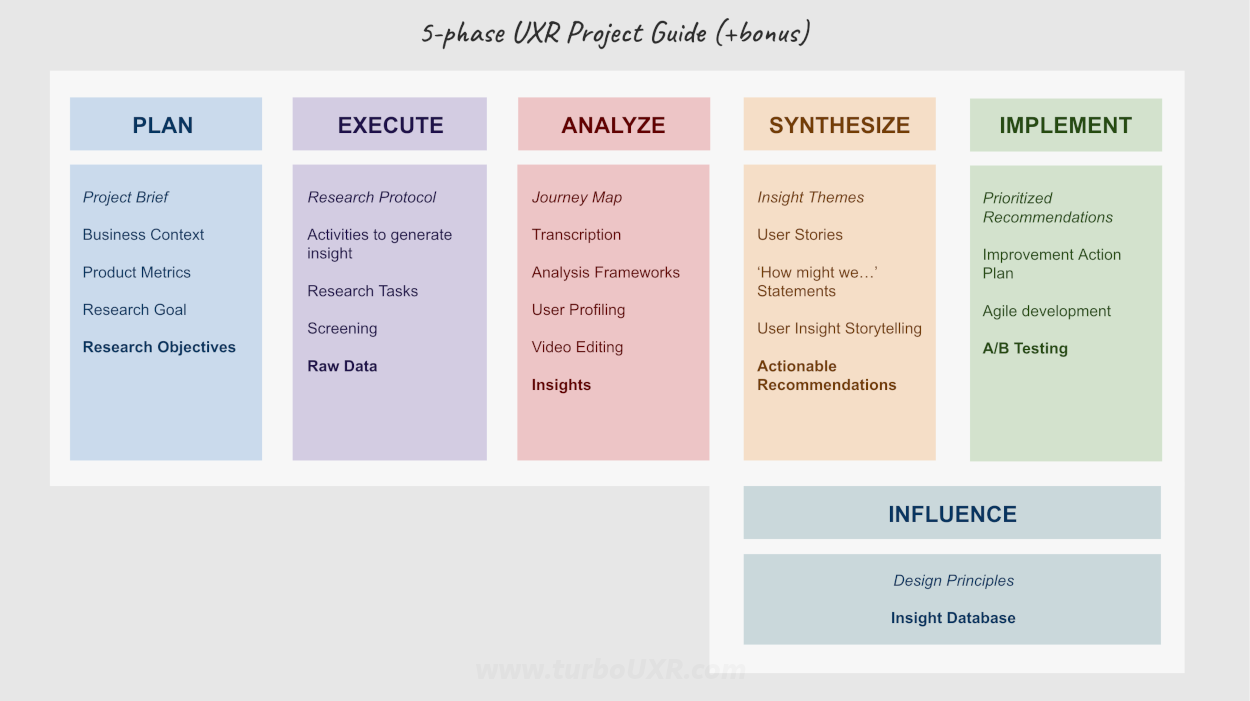
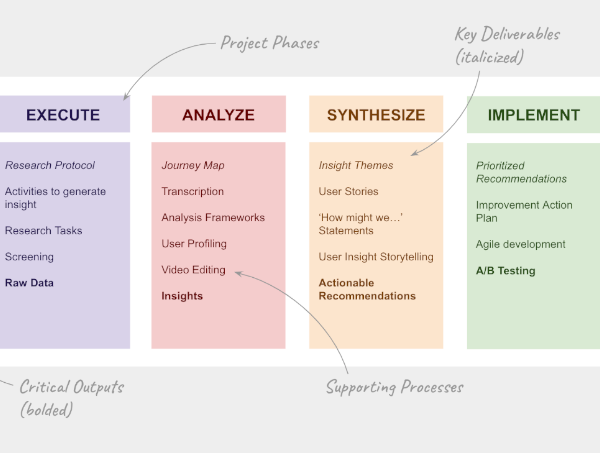
Meaningful creation of individual insights fits within the analysis phase. In any fast-paced organization, you will not get the time to break down every insight into its own standalone part. Sometimes quick and dirty documentation as-you-go in a spreadsheet suffices. However, we can say from experience, that finding/making the extra time to break down insights in detailed fashion helps greatly in the future synthesis phase for the project, as well as bigger, cross-project synthesis efforts.
Having detailed insights that map back to the actual users is incredibly useful for tracking. Ultimately, they'll be leveraged across synthesis, implementation, and even future project planning.
Enjoy the sense-making process, and know that you're creating long-term strategic value for your company, team, and user base 🥰.
Back to top ⤴
Work smarter, not harder.
The Turbo UXR Playbook is your tactical reference 👇 guide — free to download!
Get the Playbook
Learn More